maadhaar App Download 2026
It is now extremely popular to store essential documents using smartphones. In an attempt to facilitate the access to Aadhaar services, the Unique Identification Authority of India came up with the mAadhaar application.
The mAadhaar app is basically for storing Aadhaar services on a user’s smartphone device. With the help of this app, users are able to hold their Aadhaar, update details, share Aadhaar, and use other services related to Aadhaar without having the physical Aadhaar card.
The app is designed to make Aadhaar management easy, secure, and paperless for residents across India.
What is mAadhaar App?
mAadhaar is the mobile application created by UIDAI for people having Aadhaar card. It is an application which provides online access to Aadhaar information as well as online Aadhaar services.
It acts like portable Aadhaar which enables users to manage Aadhaar information anytime and anywhere via their smart phones.
It can be downloaded on both Android as well as iOS operating system based mobiles.
Features of mAadhaar App
Some of the features of the application that can be used by Aadhaar users are mentioned below.
Carry Aadhaar Digitally
A user can attach his or her Aadhaar profile on this app and use it as an identification proof.
Download e-Aadhaar
Through this app, one can download his or her Aadhaar card easily anytime.
Share Aadhaar Securely
One can share Aadhaar details safely using QR code and masked Aadhaar options.
Lock and Unlock Biometrics
It helps in protecting fingerprint and iris scan information against misuse.
Update Aadhaar Address
Users can update Aadhaar address through the online Aadhaar portal connected with this app.
Recover Aadhaar Number
If someone forgets Aadhaar number or Enrollment ID, it can be recovered through the app.
Verify Aadhaar
The app allows users to verify Aadhaar number along with linked email and mobile number.
Find Aadhaar Centers
This app helps users locate nearby Aadhaar Seva Kendras quickly and easily.
How to Download mAadhaar App
The installation process of this application is very easy and can be done within a few minutes.
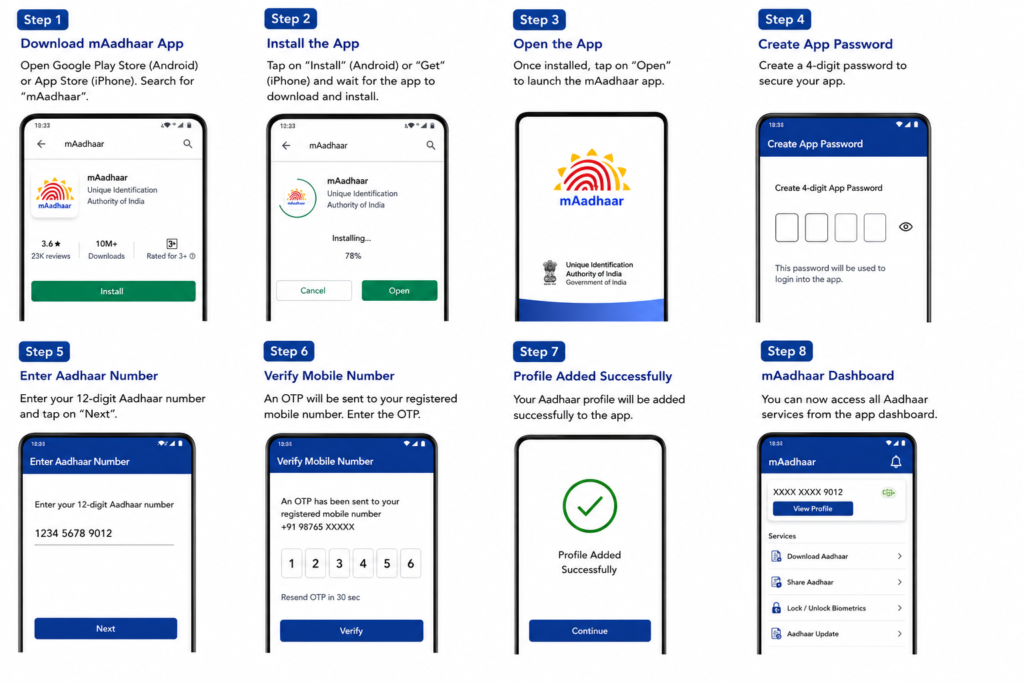
For Android Users
- Launch Google Play Store.
- Search “mAadhaar” on Google Play Store.
- Install the genuine UIDAI app.
For iPhone Users
- Launch Apple App Store.
- Search “mAadhaar” on Apple App Store.
- Install the application.
Always use the official app released by UIDAI.
How to Register on mAadhaar App
The procedure for installing the mAadhaar application is straightforward:
- Launch the mAadhaar app.
- Set a 4-digit PIN code.
- Input your Aadhaar card number.
- Complete verification using OTP received on your registered phone number.
- The Aadhaar profile would be created successfully.
Users can make use of Aadhaar services using the app interface after successful registration.
Benefits of Using mAadhaar App
Convenient Availability
Instant access is provided to all information contained in the Aadhaar card.
No Paper Requirement
Individuals may not necessarily require carrying their Aadhaar cards in paper form.
Enhanced Safety
Safety measures such as biometric locking and password protection increase security.
Efficient Processing of Aadhaar Services
Many Aadhaar-related services may be processed in a matter of minutes.
Helpful While Travelling
Digital Aadhaar stored in the app can help during hotel check-ins or identity verification.
Digital Aadhaar kept in the app may be helpful while travelling.
Is mAadhaar Valid as Aadhaar Proof?
Yes, the digital Aadhaar provided by the app is regarded as a valid means of identification under UIDAI rules.
There are numerous organizations that use digital Aadhaar as a verification tool.
Common Problems in mAadhaar App
Some users may face issues such as:
- OTP not received
- Mobile number not linked with Aadhaar
- Login errors
- App not opening properly
- Aadhaar profile not updating
Most of these problems can be solved by updating the app or verifying mobile details.
Tips for Safe Usage of mAadhaar
- Never share your OTP with anyone.
- Use a strong app password.
- Download the app only from official stores.
- Keep your mobile number updated with Aadhaar.
- Lock biometrics when not needed.
Conclusion
The mAadhaar app has helped make Aadhaar services much easier and accessible to Indian citizens. From using digital Aadhaar to conducting Aadhaar transactions, the app enables you to do all of that right from your mobile phone.
It is one such digital option which can help you gain access to your Aadhaar data with complete security and convenience.