How to Link Aadhaar Card with PAN Card Online
There are many reasons why one may be required to Link Aadhaar Card with PAN Card. But if you have doubts about the difficulty level of the task, it is not at all hard. It can be done online without the need to visit any office.
Many users postpone this task due to their fear of having to do a lot of paper work. But in most cases, if your details on both the cards are right, then the entire process takes no more than a few minutes.
In this article, we will talk about linking of Aadhaar with PAN card online, information needed for the same, and some common issues faced by people during the process.
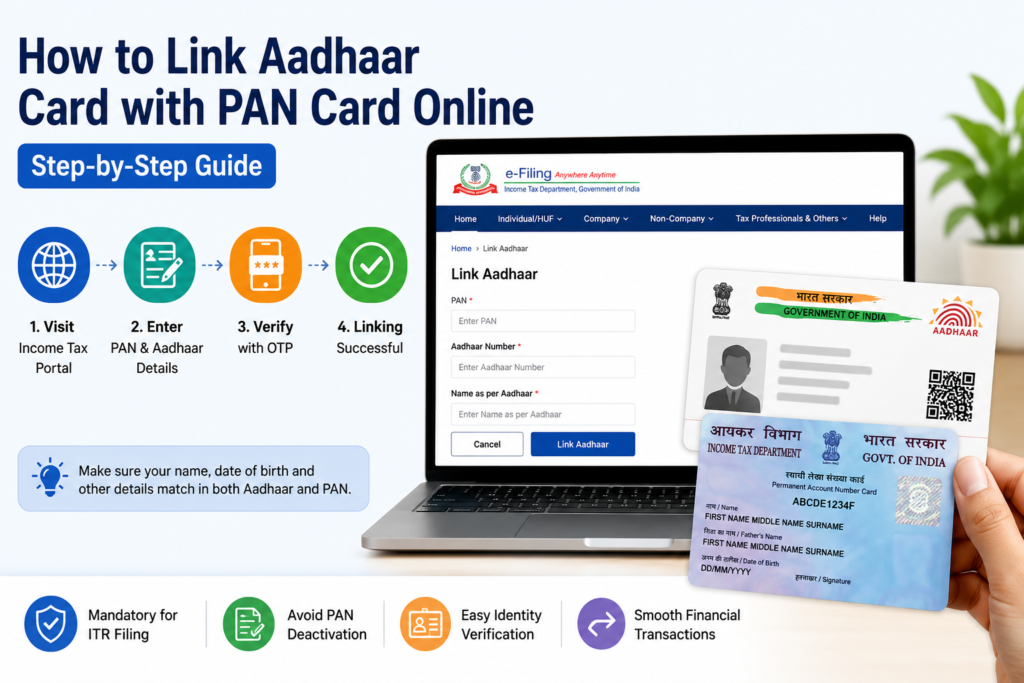
Link Aadhaar Card with PAN Card
Why Is Aadhaar PAN Linking Important?
Both PAN and Aadhaar are crucial pieces of documentation that serve different purposes in India. The former is usually needed for income tax and other financial purposes, whereas the latter is commonly used as proof of identity.
Having these two pieces of documentation linked makes verification easy and ensures that records are kept up-to-date. It might also prevent problems from arising during the use of certain tax services in the future.
People generally only verify these documents when they need them urgently due to income tax filing or some kind of financial task at hand.
Details You Should Keep Ready
While initiating the process of Aadhaar PAN linking, keep a couple of things ready.
You will require:
- PAN card number
- Aadhaar number
- Number associated with Aadhaar
- Details in both documents accurate
One little thing which could be a hindrance to this entire procedure is the mismatch of details. In case there is any mismatch of details such as name or date of birth in Aadhaar and PAN card, then linking cannot take place.
For instance, a slight misspelling in the name could pose some difficulty in the verification process.
Steps to Link Aadhaar Card with PAN Online
The whole procedure is easy and can be done via your phone or computer.
Step 1: Access the Income Tax Portal
Navigate to the Income Tax e-filing portal website. On the home page of the website, there will be an option related to Aadhaar linking.
Step 2: Enter PAN and Aadhaar Number
Enter your PAN number and Aadhaar number in the form carefully. Make sure that the information is entered correctly as even a slight error can create trouble for you.
Step 3: Verification of Information
Sometimes, you may be sent an OTP on the mobile number linked to your Aadhaar account. Provide the OTP and move further.
Step 4: Request Submission
After verifying all the information provided, click on the request submission button. If the information provided is correct, then the linking process will be successful.
How to Check Aadhaar PAN Link Status
If you are uncertain as to whether your PAN is already linked to your Aadhaar number, you can check this by logging onto the web site.
Click on the ‘Aadhaar-PAN status’ tab at the Income Tax portal. Type both the numbers and hit ‘submit’.
Common Problems During Aadhaar PAN Linking
Though the procedure is straightforward, at times, users encounter certain problems.
Name Mismatch
Your request might not work if your names are different in Aadhaar and PAN.
Date of Birth Error
Even the slightest difference in date of birth details may lead to verification errors.
Mobile Number Inactive/Changed
Your OTP verification will not go through if you change your mobile number linked to Aadhaar.
Aadhaar or PAN Details Wrong
Typing mistakes are common, so make sure you double-check before submitting your details.
FAQs
Can I link Aadhaar with PAN using my mobile phone?
Yes, the process works smoothly on smartphones as well.
How much time does Aadhaar PAN linking take?
In most situations, it is completed quickly, although status updates may sometimes take longer.
What should I do if Aadhaar PAN linking fails?
You should first check for mismatched details like name, date of birth, or incorrect mobile number.
Conclusion
Linking Aadhaar with PAN yet significant step to undertake, which will save time in the long run. As the process is done online, it can be completed within a few minutes, sitting at one’s home. However, one needs to ensure that their details are correctly matched.